Remove Object from Video
Erase object from video, fast, free, and with no hassle. Remove unwanted elements, characters, and objects, and clean up your video content.
How To Remove Object from Video
Import Your Video to Remove Object Online
Upload the video in which you want to remove video objects. ImagineArt video eraser supports MP4, MOV, and all video formats. For best results, use footage where the object you want removed is clearly visible against the background.
Write Prompt to Clean Up Video
Next, write a detailed prompt to erase object from video. Be specific: "remove the person" "remove the watermark," or "clean up the text". AI video remover reconstructs the scene and background after object removal.
Finalize and Generate
Select the desired aspect ratio and click ‘Generate’ to process the AI video object removal. The AI removes the object and fills in the background. Download your cleaned video in MP4 format.

No Brushwork, No Blur: Describe What to Remove

Clean Up Video for Social Media and Marketing
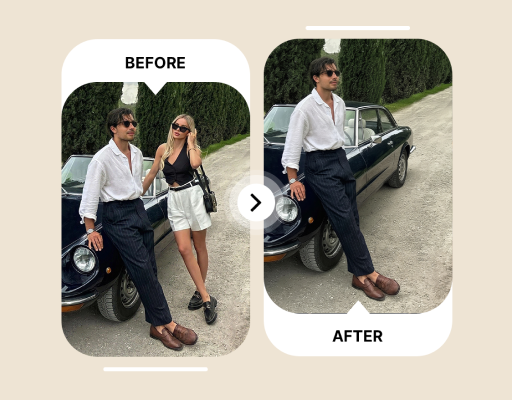
Remove Person from Video
Remove a specific person, an unwanted bystander, or a crowd in the background from any clip. Video object remover tracks the person across frames and reconstructs the background behind them, so the object removal holds even when they're moving. Useful for travel footage, event recordings, and any outdoor shot where someone walked into frame at the wrong moment.








Trusted by Professionals and Creators from top Brands and Companies
Reviews
The interface is super-easy, and I didn’t need any editing skills. I quickly edited out a few intruding people from my daily vlog, and the generated video was of the same quality. I might use it more often now. Highly recommended!

Anya Petrova

When you are a YouTuber, you need new and better video editing tools to speed up the process. I found this AI video object remover, and it did a great job at removing the unwanted characters from different scenes. Really fast and fun to use!

Ben Harris

I wanted to remove the watermark from my filmmaking assignment, but I was somehow unable to do that. With this AI video object remover, I not only erase it, but it also doesn’t impact the composition or quality of the video. Life-saver!

Isabelle Kim

I have spent hours and days editing out tiny details and couldn’t produce satisfactory results. But with ImagineArt AI video object remover, I only need to add a video and a prompt, and let AI handle the difficult part. It is now a must-have tool for me.

Michael Chenn

Common Questions About Remove Object from Video
An AI video object remover is a tool that detects and erases object from video, such as people, watermarks, logos, text, or physical stuff. It then reconstructs the background so the removed area looks natural. ImagineArt AI video object eraser uses generative AI to fill the gap automatically, without manual frame-by-frame editing.
Yes, ImagineArt AI video object removal app can remove both static and moving objects and characters from videos. it tracks moving objects and people across frames and applies the removal consistently for the full duration of the clip. Add accurate details about the object or character you want to remove, and the AI will handle the rest.
ImagineArt AI video object removal app takes a couple of minutes to erase object from video online. However, the time taken also depends on the length of the video and the complexity of your prompt.
Yes. Upload your clip and describe the person you want to remove from video. "The man in the red jacket in the background" or "the woman walking through the frame on the right." The AI person remover tracks the mentioned character across all frames and removes them, then reconstructs the background behind them.
Yes, ImagineArt AI object remover is free to use. Sign up on ImagineArt and receive 100 free daily credits that you can use to remove object from video and explore other ImagineArt apps.
No, the quality of your video will remain the same. ImagineArt remove object from video app uses generative inpainting and advanced AI algorithms to reconstruct background and remove objects and characters without impacting the overall quality.
Describe the object, where it is in the frame, and whether it moves. These prompts work well: "Remove the watermark in the top right corner" "Erase the person walking in the background on the left side" "Clean up the text overlay at the bottom of the screen" "Remove the car parked in the foreground" Vague prompts like "remove the thing" produce less accurate results. The more you describe it, the better the AI can isolate it.
ImagineArt AI video object removal app supports MP4, MOV, and most commonly used video formats, sizes, and orientations. The edited video is delivered as MP4.